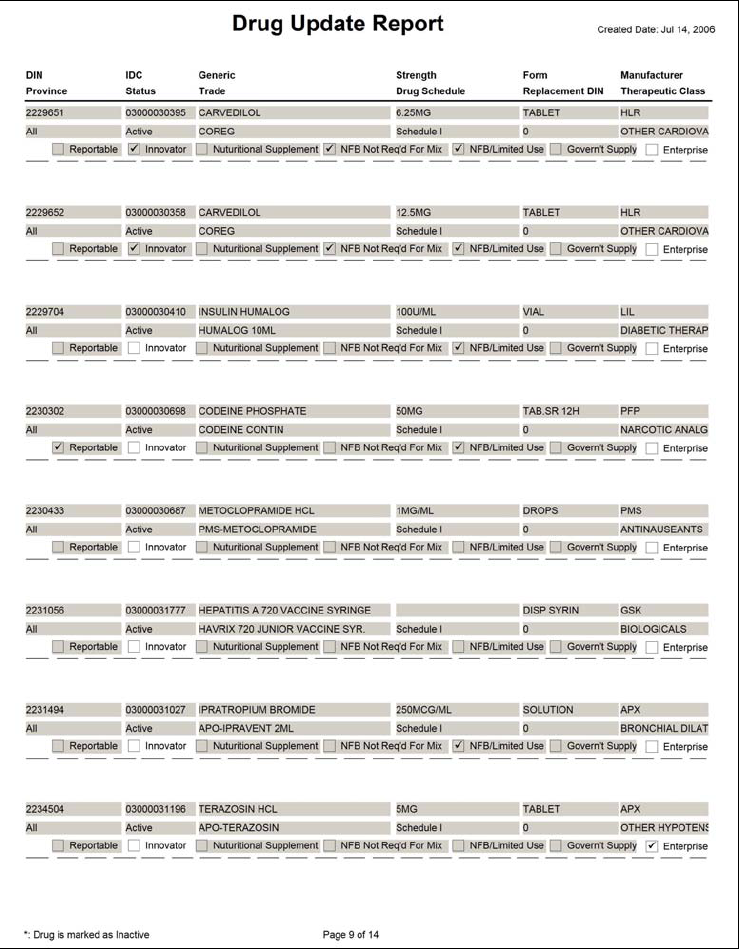
DIN: The DIN for the updated drug. DIN: The DIN for the updated drug. DIN: The DIN for the updated drug. DIN: The DIN for the updated drug. DIN: The DIN for the updated drug. DIN: The DIN for the updated drug. DIN: The DIN for the updated drug. DIN: The DIN for the updated drug. DIN: The DIN for the updated drug. Province: The province for which the update was applied. Province: The province for which the update was applied. Province: The province for which the update was applied. Province: The province for which the update was applied. DIN: The DIN for the updated drug. DIN: The DIN for the updated drug. DIN: The DIN for the updated drug. DIN: The DIN for the updated drug. IDC: This number links the drug to its appropriate counselling information and auxiliary labels.  It cannot be viewed from PharmaClik Rx, as it is part of the database. IDC: This number links the drug to its appropriate counselling information and auxiliary labels.  It cannot be viewed from PharmaClik Rx, as it is part of the database. IDC: This number links the drug to its appropriate counselling information and auxiliary labels.  It cannot be viewed from PharmaClik Rx, as it is part of the database. IDC: This number links the drug to its appropriate counselling information and auxiliary labels.  It cannot be viewed from PharmaClik Rx, as it is part of the database. IDC: This number links the drug to its appropriate counselling information and auxiliary labels.  It cannot be viewed from PharmaClik Rx, as it is part of the database. IDC: This number links the drug to its appropriate counselling information and auxiliary labels.  It cannot be viewed from PharmaClik Rx, as it is part of the database. IDC: This number links the drug to its appropriate counselling information and auxiliary labels.  It cannot be viewed from PharmaClik Rx, as it is part of the database. IDC: This number links the drug to its appropriate counselling information and auxiliary labels.  It cannot be viewed from PharmaClik Rx, as it is part of the database. IDC: This number links the drug to its appropriate counselling information and auxiliary labels.  It cannot be viewed from PharmaClik Rx, as it is part of the database. Status: The status of the drug at : Active or Inactive. Once a drug is inactive, it no longer appears in the Drug Search window. Status: The status of the drug at : Active or Inactive. Once a drug is inactive, it no longer appears in the Drug Search window. Status: The status of the drug at : Active or Inactive. Once a drug is inactive, it no longer appears in the Drug Search window. Status: The status of the drug at : Active or Inactive. Once a drug is inactive, it no longer appears in the Drug Search window. Status: The status of the drug at : Active or Inactive. Once a drug is inactive, it no longer appears in the Drug Search window. Status: The status of the drug at : Active or Inactive. Once a drug is inactive, it no longer appears in the Drug Search window. Status: The status of the drug at : Active or Inactive. Once a drug is inactive, it no longer appears in the Drug Search window. Status: The status of the drug at : Active or Inactive. Once a drug is inactive, it no longer appears in the Drug Search window. Status: The status of the drug at : Active or Inactive. Once a drug is inactive, it no longer appears in the Drug Search window. Province: The province for which the update was applied. Reportable: This box is selected if the drug is reportable. Reportable: This box is selected if the drug is reportable. Reportable: This box is selected if the drug is reportable. Reportable: This box is selected if the drug is reportable. Reportable: This box is selected if the drug is reportable. Reportable: This box is selected if the drug is reportable. Reportable: This box is selected if the drug is reportable. Reportable: This box is selected if the drug is reportable. Innovator: This box is selected if this is the innovator drug in a group of interchangeables (e.g. TYLENOL 325MG TABLET is the Innovator for all drugs in the ACETAMINOPHEN 325MG TABLET interchangeable group). Innovator: This box is selected if this is the innovator drug in a group of interchangeables (e.g. TYLENOL 325MG TABLET is the Innovator for all drugs in the ACETAMINOPHEN 325MG TABLET interchangeable group). Innovator: This box is selected if this is the innovator drug in a group of interchangeables (e.g. TYLENOL 325MG TABLET is the Innovator for all drugs in the ACETAMINOPHEN 325MG TABLET interchangeable group). Innovator: This box is selected if this is the innovator drug in a group of interchangeables (e.g. TYLENOL 325MG TABLET is the Innovator for all drugs in the ACETAMINOPHEN 325MG TABLET interchangeable group). Innovator: This box is selected if this is the innovator drug in a group of interchangeables (e.g. TYLENOL 325MG TABLET is the Innovator for all drugs in the ACETAMINOPHEN 325MG TABLET interchangeable group). Innovator: This box is selected if this is the innovator drug in a group of interchangeables (e.g. TYLENOL 325MG TABLET is the Innovator for all drugs in the ACETAMINOPHEN 325MG TABLET interchangeable group). Innovator: This box is selected if this is the innovator drug in a group of interchangeables (e.g. TYLENOL 325MG TABLET is the Innovator for all drugs in the ACETAMINOPHEN 325MG TABLET interchangeable group). Innovator: This box is selected if this is the innovator drug in a group of interchangeables (e.g. TYLENOL 325MG TABLET is the Innovator for all drugs in the ACETAMINOPHEN 325MG TABLET interchangeable group). Generic: The drug’s generic name. Generic: The drug’s generic name. Generic: The drug’s generic name. Generic: The drug’s generic name. Generic: The drug’s generic name. Generic: The drug’s generic name. Generic: The drug’s generic name. Generic: The drug’s generic name. Generic: The drug’s generic name. Trade: The drug’s trade name. Trade: The drug’s trade name. Trade: The drug’s trade name. Trade: The drug’s trade name. Trade: The drug’s trade name. Trade: The drug’s trade name. Trade: The drug’s trade name. Trade: The drug’s trade name. Nutritional Supplement: This box is selected if the Ontario Ministry of Health classifies the drug as a Nutritional Supplement. Nutritional Supplement: This box is selected if the Ontario Ministry of Health classifies the drug as a Nutritional Supplement. Nutritional Supplement: This box is selected if the Ontario Ministry of Health classifies the drug as a Nutritional Supplement. Nutritional Supplement: This box is selected if the Ontario Ministry of Health classifies the drug as a Nutritional Supplement. Nutritional Supplement: This box is selected if the Ontario Ministry of Health classifies the drug as a Nutritional Supplement. Nutritional Supplement: This box is selected if the Ontario Ministry of Health classifies the drug as a Nutritional Supplement. Nutritional Supplement: This box is selected if the Ontario Ministry of Health classifies the drug as a Nutritional Supplement. Nutritional Supplement: This box is selected if the Ontario Ministry of Health classifies the drug as a Nutritional Supplement. NFB Not Req’d For Mix: This box is selected if the drug requires a Medical Reason for Use code (Limited Use Code) for regular prescriptions submitted to Ontario Drug Benefit, but not for those where the drug is part of a mixture. NFB Not Req’d For Mix: This box is selected if the drug requires a Medical Reason for Use code (Limited Use Code) for regular prescriptions submitted to Ontario Drug Benefit, but not for those where the drug is part of a mixture. NFB Not Req’d For Mix: This box is selected if the drug requires a Medical Reason for Use code (Limited Use Code) for regular prescriptions submitted to Ontario Drug Benefit, but not for those where the drug is part of a mixture. NFB Not Req’d For Mix: This box is selected if the drug requires a Medical Reason for Use code (Limited Use Code) for regular prescriptions submitted to Ontario Drug Benefit, but not for those where the drug is part of a mixture. NFB Not Req’d For Mix: This box is selected if the drug requires a Medical Reason for Use code (Limited Use Code) for regular prescriptions submitted to Ontario Drug Benefit, but not for those where the drug is part of a mixture. NFB Not Req’d For Mix: This box is selected if the drug requires a Medical Reason for Use code (Limited Use Code) for regular prescriptions submitted to Ontario Drug Benefit, but not for those where the drug is part of a mixture. NFB Not Req’d For Mix: This box is selected if the drug requires a Medical Reason for Use code (Limited Use Code) for regular prescriptions submitted to Ontario Drug Benefit, but not for those where the drug is part of a mixture. NFB Not Req’d For Mix: This box is selected if the drug requires a Medical Reason for Use code (Limited Use Code) for regular prescriptions submitted to Ontario Drug Benefit, but not for those where the drug is part of a mixture. Strength: The drug’s strength. Strength: The drug’s strength. Strength: The drug’s strength. Strength: The drug’s strength. Strength: The drug’s strength. Strength: The drug’s strength. Strength: The drug’s strength. Strength: The drug’s strength. Drug Schedule: The drug’s legislated schedule.  This can be Schedule I, Schedule II, Schedule III or Schedule IV. Strength: The drug’s strength. Drug Schedule: The drug’s legislated schedule.  This can be Schedule I, Schedule II, Schedule III or Schedule IV. Drug Schedule: The drug’s legislated schedule.  This can be Schedule I, Schedule II, Schedule III or Schedule IV. Drug Schedule: The drug’s legislated schedule.  This can be Schedule I, Schedule II, Schedule III or Schedule IV. Drug Schedule: The drug’s legislated schedule.  This can be Schedule I, Schedule II, Schedule III or Schedule IV. Drug Schedule: The drug’s legislated schedule.  This can be Schedule I, Schedule II, Schedule III or Schedule IV. Drug Schedule: The drug’s legislated schedule.  This can be Schedule I, Schedule II, Schedule III or Schedule IV. Drug Schedule: The drug’s legislated schedule.  This can be Schedule I, Schedule II, Schedule III or Schedule IV. Drug Schedule: The drug’s legislated schedule.  This can be Schedule I, Schedule II, Schedule III or Schedule IV. Form: The drug’s dosage form (e.g. tablet, oral suspension, etc...). Form: The drug’s dosage form (e.g. tablet, oral suspension, etc...). Form: The drug’s dosage form (e.g. tablet, oral suspension, etc...). Form: The drug’s dosage form (e.g. tablet, oral suspension, etc...). Form: The drug’s dosage form (e.g. tablet, oral suspension, etc...). Form: The drug’s dosage form (e.g. tablet, oral suspension, etc...). Form: The drug’s dosage form (e.g. tablet, oral suspension, etc...). Form: The drug’s dosage form (e.g. tablet, oral suspension, etc...). Replacement DIN: A Replacement DIN links the old DIN for a product to the new DIN.  If a drug has a Replacement DIN, it will be shown here.  Where there is no Replacement DIN, this field is 0. Replacement DIN: A Replacement DIN links the old DIN for a product to the new DIN.  If a drug has a Replacement DIN, it will be shown here.  Where there is no Replacement DIN, this field is 0. Replacement DIN: A Replacement DIN links the old DIN for a product to the new DIN.  If a drug has a Replacement DIN, it will be shown here.  Where there is no Replacement DIN, this field is 0. Replacement DIN: A Replacement DIN links the old DIN for a product to the new DIN.  If a drug has a Replacement DIN, it will be shown here.  Where there is no Replacement DIN, this field is 0. Replacement DIN: A Replacement DIN links the old DIN for a product to the new DIN.  If a drug has a Replacement DIN, it will be shown here.  Where there is no Replacement DIN, this field is 0. Replacement DIN: A Replacement DIN links the old DIN for a product to the new DIN.  If a drug has a Replacement DIN, it will be shown here.  Where there is no Replacement DIN, this field is 0. Replacement DIN: A Replacement DIN links the old DIN for a product to the new DIN.  If a drug has a Replacement DIN, it will be shown here.  Where there is no Replacement DIN, this field is 0. Replacement DIN: A Replacement DIN links the old DIN for a product to the new DIN.  If a drug has a Replacement DIN, it will be shown here.  Where there is no Replacement DIN, this field is 0. Form: The drug’s dosage form (e.g. tablet, oral suspension, etc...). Replacement DIN: A Replacement DIN links the old DIN for a product to the new DIN.  If a drug has a Replacement DIN, it will be shown here.  Where there is no Replacement DIN, this field is 0. Manufacturer: The 3-letter manufacturer code for the drug. Manufacturer: The 3-letter manufacturer code for the drug. Manufacturer: The 3-letter manufacturer code for the drug. Manufacturer: The 3-letter manufacturer code for the drug. Manufacturer: The 3-letter manufacturer code for the drug. Manufacturer: The 3-letter manufacturer code for the drug. Manufacturer: The 3-letter manufacturer code for the drug. Manufacturer: The 3-letter manufacturer code for the drug. Therapeutic Class: The drug’s therapeutic class. Therapeutic Class: The drug’s therapeutic class. Therapeutic Class: The drug’s therapeutic class. Therapeutic Class: The drug’s therapeutic class. Therapeutic Class: The drug’s therapeutic class. Therapeutic Class: The drug’s therapeutic class. Therapeutic Class: The drug’s therapeutic class. Therapeutic Class: The drug’s therapeutic class. Therapeutic Class: The drug’s therapeutic class. Manufacturer: The 3-letter manufacturer code for the drug. Enterprise: This box is selected if the drug is eligible for Enterprise. Enterprise: This box is selected if the drug is eligible for Enterprise. Enterprise: This box is selected if the drug is eligible for Enterprise. Enterprise: This box is selected if the drug is eligible for Enterprise. Enterprise: This box is selected if the drug is eligible for Enterprise. Enterprise: This box is selected if the drug is eligible for Enterprise. Enterprise: This box is selected if the drug is eligible for Enterprise. Enterprise: This box is selected if the drug is eligible for Enterprise. NFB/Limited Use: This box is selected if the drug is a non-formulary benefit.  In Ontario, these are considered Limited Use drugs. NFB/Limited Use: This box is selected if the drug is a non-formulary benefit.  In Ontario, these are considered Limited Use drugs. NFB/Limited Use: This box is selected if the drug is a non-formulary benefit.  In Ontario, these are considered Limited Use drugs. NFB/Limited Use: This box is selected if the drug is a non-formulary benefit.  In Ontario, these are considered Limited Use drugs. NFB/Limited Use: This box is selected if the drug is a non-formulary benefit.  In Ontario, these are considered Limited Use drugs. NFB/Limited Use: This box is selected if the drug is a non-formulary benefit.  In Ontario, these are considered Limited Use drugs. NFB/Limited Use: This box is selected if the drug is a non-formulary benefit.  In Ontario, these are considered Limited Use drugs. NFB/Limited Use: This box is selected if the drug is a non-formulary benefit.  In Ontario, these are considered Limited Use drugs. Govern’t Supply: This box is selected if the drug is supplied to Long Term Care facilities by the provincial government. Govern’t Supply: This box is selected if the drug is supplied to Long Term Care facilities by the provincial government. Govern’t Supply: This box is selected if the drug is supplied to Long Term Care facilities by the provincial government. Govern’t Supply: This box is selected if the drug is supplied to Long Term Care facilities by the provincial government. Govern’t Supply: This box is selected if the drug is supplied to Long Term Care facilities by the provincial government. Govern’t Supply: This box is selected if the drug is supplied to Long Term Care facilities by the provincial government. Govern’t Supply: This box is selected if the drug is supplied to Long Term Care facilities by the provincial government. Govern’t Supply: This box is selected if the drug is supplied to Long Term Care facilities by the provincial government.

Drug Update Report

The Drug Update Report lists all drugs that have been added and updated since the last download. The report does not include updates that have the Action set to Do Later in the Review Overrides Drug Updates tab. The Drug Update Report does not include drugs that have received Supplier Price updates.

Note: Presently, the Drug Update Report only includes the updates to existing drugs. It does not include the new drugs that have been added. This will be corrected in a future version of PharmaClik Rx.

To view or print the drug update report:

  1. Press the More > Updates> Update Report. The Drug Update Report appears in a preview window.
  2. Use the scrollbars along the side and bottom of the window to view the report.
  3. To view the next page, press the Page Down key on the keyboard. To view the previous page, press the Page Up key on the keyboard.

Note: On the report, the fields highlighted in grey are fields that have been updated.

  1. Press the Print button to print the report.
  2. Press the OK button to close the window.

Sample Report

Use your mouse to rollover the fields below for more information.